I tested GitBook's Pro plan hands-on in 2026. Here is an honest review covering the editor, GitBook Agent, pricing breakdown, pitfalls, and better alternatives for smaller teams.
GitBook Review 2026: Is It Still the Best Tool for Developer Documentation?
I signed up for GitBook’s Pro plan, built out a documentation site from scratch, and spent time testing the editor, AI features, publishing workflow, and collaboration tools. This is not a review based on screenshots or marketing pages. Everything here comes from hands-on use.
GitBook is a documentation platform built for developer-facing teams. It has been around since 2014 and has grown into one of the most widely used tools for publishing product docs, API references, and knowledge bases.
First Impressions: Onboarding and Setup
Getting into GitBook is fast. Google SSO, no credit card for the free tier, and I was inside a clean dashboard in under two minutes. The left sidebar gives you everything upfront: Docs Sites, Change Requests, OpenAPI, Translations, Integrations. Nothing is buried.
What struck me immediately was how intentional the UI feels. New features are flagged with a NEW badge, which sounds like a small thing but signals that the team actually ships. The overall vibe is: documentation should not feel like a chore.
I tested on the Pro plan, which unlocks the full AI feature set. The gap between the free tier and what Pro gives you is significant, and I will get into that in the pricing section.
Onboarding verdict: One of the cleanest first-run experiences in the documentation tool space. Zero friction from sign-up to your first page.
The Editor Experience
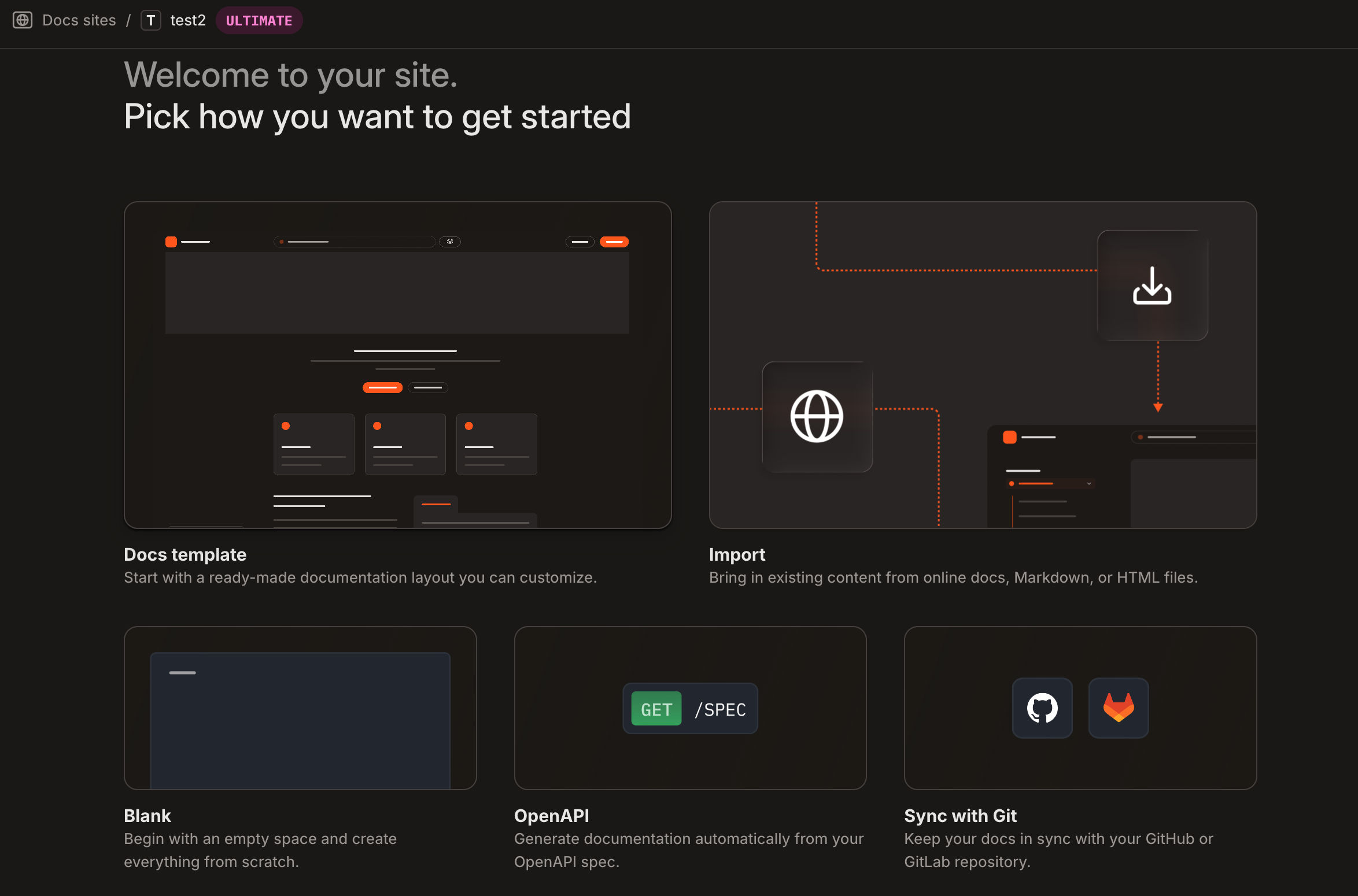
GitBook’s editor is block-based, similar to Notion but built with technical documentation in mind. You get the basics: rich text, headings, callouts, code blocks with syntax highlighting, plus things Notion does not have like API reference blocks, OpenAPI endpoint rendering, expandable sections, and embedded file previews.
The editor lets you create new content in five ways:
- Docs template: a structured layout you can customise
- Import: pull in Markdown, HTML, or content from other tools
- Blank: start from scratch
- OpenAPI: auto-generate API docs from your spec
- Sync with Git: keep content bidirectionally synced with GitHub or GitLab
The context-awareness is genuinely good. Insert a code block and it auto-detects the language. Paste an OpenAPI spec URL and it scaffolds endpoint pages, parameter tables, and request/response examples automatically. It removes a lot of the repetitive work that makes documentation painful.
I did notice the editor slowing down on longer pages. I will cover this in more detail in the pitfalls section, but it is worth flagging here: if your docs pages tend to run long, keep an eye on this during your own evaluation.
Docs Sites: How GitBook Structures Your Content
GitBook separates Spaces (where you write) from Docs Sites (where content gets published). This architectural decision trips up new users. A lot of people create content in the wrong place and cannot figure out why their edits are not showing on their live site.
Once you get it, though, it is genuinely powerful. A single Docs Site can pull from multiple Spaces, so you can publish API docs, product guides, and a changelog as one unified, navigable documentation site. For companies managing large or multi-product documentation sets, this is a real advantage.
The published reader experience is polished: fast search, clean typography, dark mode, and mobile-responsive layouts. The default theme is honestly nicer than most custom documentation sites I have seen.
Change Requests: Git-Style Docs Workflows

Change Requests are one of the most underrated features in GitBook. Instead of editing live docs directly, contributors open a Change Request, a proposed edit that goes through review and approval before it is merged into the live site. Think of it like a pull request, but for documentation.
This sounds bureaucratic. In practice, for any team where documentation accuracy matters (API companies, compliance-heavy industries, or teams where a wrong sentence means a support ticket) it is essential. It makes documentation contribution safe for junior writers or external contributors.
The Change Requests panel shows you all open requests across your organisation, filterable by status. You can see what is actively under review, what is waiting on someone else to action, and what requires your attention. The new centralised screen that shipped in late 2025 makes it much easier to track everything when you are working across a larger team.
For solo users, Change Requests feel like overhead. For teams of five or more writing documentation that people actually depend on, it is the feature that makes GitBook worth paying for.
What Is Actually New in GitBook in 2026
GitBook shipped fast in the last year. Here is what is genuinely new versus what was already there:
1. GitBook Agent (Open Beta)
This is the headline. GitBook Agent is an AI collaborator built directly into the docs workflow. You can @mention it in comments, add it as a reviewer on a change request, or give it a prompt and have it open a Change Request with proposed edits.
What it does today: write docs based on a prompt, act as a linter and style-guide checker, review change requests before they are merged, and handle AI-powered translations.
What it does not do yet (but is on the roadmap): proactively monitor support tickets and GitHub issues to identify documentation gaps. The Agent is currently reactive, not proactive. It responds to your instructions rather than independently spotting things. That proactive version is coming, but it is not here yet. Worth keeping in mind when evaluating.
GitBook Agent is available on Pro and Enterprise plans only. If you are evaluating GitBook primarily for the Agent, make sure you are on the right plan before demoing.
2. GitBook Assistant (Reader-Facing AI)
This launched in August 2025 and is a significant upgrade over the previous AI search. GitBook Assistant gives readers a chat-based interface to ask questions about your documentation. It uses agentic retrieval for more accurate answers, integrates with adaptive content to personalise responses based on what GitBook knows about the reader, and can connect to external sources via MCP servers.
The embeddable version launched in November 2025, meaning you can now embed GitBook Assistant inside your own product, not just on your docs site.
3. AI-Powered Translations
GitBook now translates your entire documentation into 36 languages using AI. The key thing here is that translations automatically update when you change the primary language content. You can add a glossary per language and set tone-of-voice instructions. For global products, this removes a genuinely painful operational bottleneck.
4. OpenAPI Auto-Documentation
Upload or link your OpenAPI spec and GitBook generates structured API reference docs automatically, covering endpoint pages, parameter tables, and request/response examples. Auto-updating API reference docs shipped in April 2025, so your docs stay in sync with your spec without manual work.
5. llms.txt and MCP Support
GitBook added built-in llms.txt and MCP server support, meaning your documentation is optimised to be surfaced by AI tools like ChatGPT and Claude. As more users interact with products through AI assistants, having your docs indexed correctly is becoming a real consideration.
Pricing: The Part That Gets Confusing

GitBook’s pricing model trips people up. There are two separate billing dimensions: Site Plans and User Plans. You need both.
| Plan | Site Plan | User Plan | Best For |
|---|---|---|---|
| Free | $0 | $0 (1 user) | Solo devs, open-source projects |
| Premium | $65/mo | $12/user/mo | Teams needing collaboration + AI Answers |
| Ultimate | $249/mo | $12/user/mo | Large orgs, full AI, white-labelling |
| Enterprise | Custom | Custom | Dedicated support, custom contracts |
The catch: a 5-person team on Premium pays $65 + (4 x $12) = $113/month, not $65. Each additional site you publish requires its own Site Plan. If you are running two products with separate docs, you are paying twice.
The moment you add a single teammate or need a custom domain, you are looking at a minimum of $65/month. GitBook is transparent about this, but it still catches teams off guard.
GitBook Agent is locked to Pro and Enterprise plans. AI Answers for readers requires the Premium Site Plan. If you want both an AI that helps your writers and an AI that helps your readers, the cost escalates quickly.
Is it worth it?
For mid-market and enterprise teams with the budget for it, GitBook’s pricing is justifiable. The feature set at the higher tiers is genuinely strong.
But for teams building AI-native documentation, this pricing model feels misaligned with where the industry is heading. AI is increasingly becoming the front door to how people discover and read documentation. Locking AI features behind expensive plan tiers means the teams that need these capabilities the most, smaller dev tool companies, AI startups, early-stage teams, are the ones least likely to afford them. Even a well-funded 10-person developer tools company might look at the total cost and question whether this is the right way to pay for documentation in 2026.
Where GitBook Excels
Developer-Focused Documentation. GitBook is built for technical teams. OpenAPI support, GitHub sync, code blocks, and API reference blocks make it the most natural home for developer documentation. If you are building an API product, the tooling is purpose-built.
Collaboration at Scale. Change Requests, GitBook Agent as a reviewer, merge rules, and the centralised change requests panel make GitBook the most rigorous documentation collaboration platform available. For teams where documentation accuracy is non-negotiable, this is the differentiator.
Content Architecture. The Spaces plus Docs Sites model scales well. You can manage dozens of content spaces and surface them through a single, unified site. For companies with multiple products or large documentation sets, this architecture holds up.
The Pitfalls Worth Knowing About
1. Confusing and Costly Pricing Model
The dual Site Plan plus User Plan billing is genuinely unclear. Real costs are higher than the headline numbers suggest, and several reviewers on popular software comparison platforms have noted that recent pricing changes, including needing to upgrade just to continue editing existing content, have frustrated teams mid-contract. Even something as basic as adding a custom domain pushes you into a paid plan, which feels steep for smaller teams that just need clean, published docs.
2. No Self-Hosted Option
GitBook is cloud-only. For enterprise teams with data residency requirements or strict security policies, this is a hard blocker. There is no on-premises or VPC-deployed version.
3. AI Features Locked Behind Expensive Tiers
GitBook’s AI capabilities are impressive, but they sit behind Pro and Enterprise plans. If you want the Agent for your writing team and the Assistant for your readers, the cost adds up fast. For smaller teams that see AI as essential to modern documentation (not a premium add-on) this gating feels like a mismatch with how the market is moving.
4. Spaces vs Sites Confusion
The architectural distinction between Spaces and Docs Sites is sound, but it consistently confuses new users. GitBook has added some onboarding guidance, but this is still one of the most common points of friction in the first week.
5. Backend Performance on Larger Content Sets
Across multiple review platforms and my own testing, the editor and dashboard can feel sluggish on large content sets or slower connections. Pages with a high block count took noticeably longer to save and render. It does not break the experience, but for a premium-priced tool, the performance should be tighter.
GitBook Alternatives Worth Considering
Velu (Recommended for Cost-Conscious Teams)
Velu is a modern documentation platform built for product and developer teams. It covers the core of what most teams actually need: a clean editor, docs site publishing, and a developer-first approach without GitBook’s layered pricing complexity.
On pricing, the difference is significant for smaller teams. Here is how it stacks up for a 5-person team:
| GitBook Premium | Velu Starter ($9/mo) | Velu Pro ($49/mo) | |
|---|---|---|---|
| Monthly cost (5 users) | $113/mo | $9/mo | $49/mo |
| Users included | 5 (plus $12/user extra) | 3 users | 10 users |
| Custom domain | Yes | Yes | Yes |
| Best for | Teams needing full AI feature set | Solo devs, small teams | Growing teams up to 10 |
For a 5-person team, GitBook Premium costs $113/month. Velu’s $49/month Pro plan covers up to 10 users at less than half the price. If you do not need GitBook Agent or the full enterprise feature set, Velu is worth evaluating first.
Mintlify
The fastest-growing GitBook competitor in the developer tools space. MDX-based, AI-first, and genuinely well-designed. The AI search and chat features are strong. A direct modern alternative if GitBook feels too heavy.
Readme.io
Purpose-built for API documentation and developer portals. Strong OpenAPI support, an API explorer, and Owlbot for reader Q&A. Narrower focus than GitBook but excellent if API docs are your primary use case.
Notion
Cheaper and more versatile, but not built for documentation. Search is weaker, published pages lack structure, and there is no native API reference support. Good for internal wikis, but not for developer-facing docs.
Confluence
The enterprise incumbent with deep Jira integration. If your team is already in the Atlassian ecosystem, Confluence is the path of least resistance. The interface feels dated compared to GitBook, and it is better suited to internal docs than public-facing developer portals.
Verdict
GitBook in 2026 is a mature, well-designed documentation platform that has grown into a serious enterprise product. The core experience of writing, organising, and publishing technical documentation is best-in-class. The new features like Change Requests, GitBook Agent, GitBook Assistant, and AI Translations address real pain points.
The gaps are real too. The pricing model is confusing and expensive, especially for smaller teams. The learning curve around Spaces, Sites, and the overall content architecture is not trivial. In a world where AI agents are increasingly the first touchpoint for documentation (not human readers browsing a sidebar) that complexity becomes a real disadvantage. Tools that are simpler to set up, easier to maintain, and natively built for AI-first discovery are going to have an edge going forward.
If pricing is not a barrier for your team, GitBook is a strong choice. The feature set is deep, the collaboration tools are mature, and the published output is polished.
If pricing is a concern, or if you want a leaner platform that covers what most DevRel teams, API companies, and developer tool startups actually need, Velu is worth a serious look. It gives you a clean, developer-first documentation experience at a fraction of the cost, without the learning curve.
Tested on GitBook Pro plan, March 2026. Pricing data sourced from GitBook’s published pricing page and third-party sources.